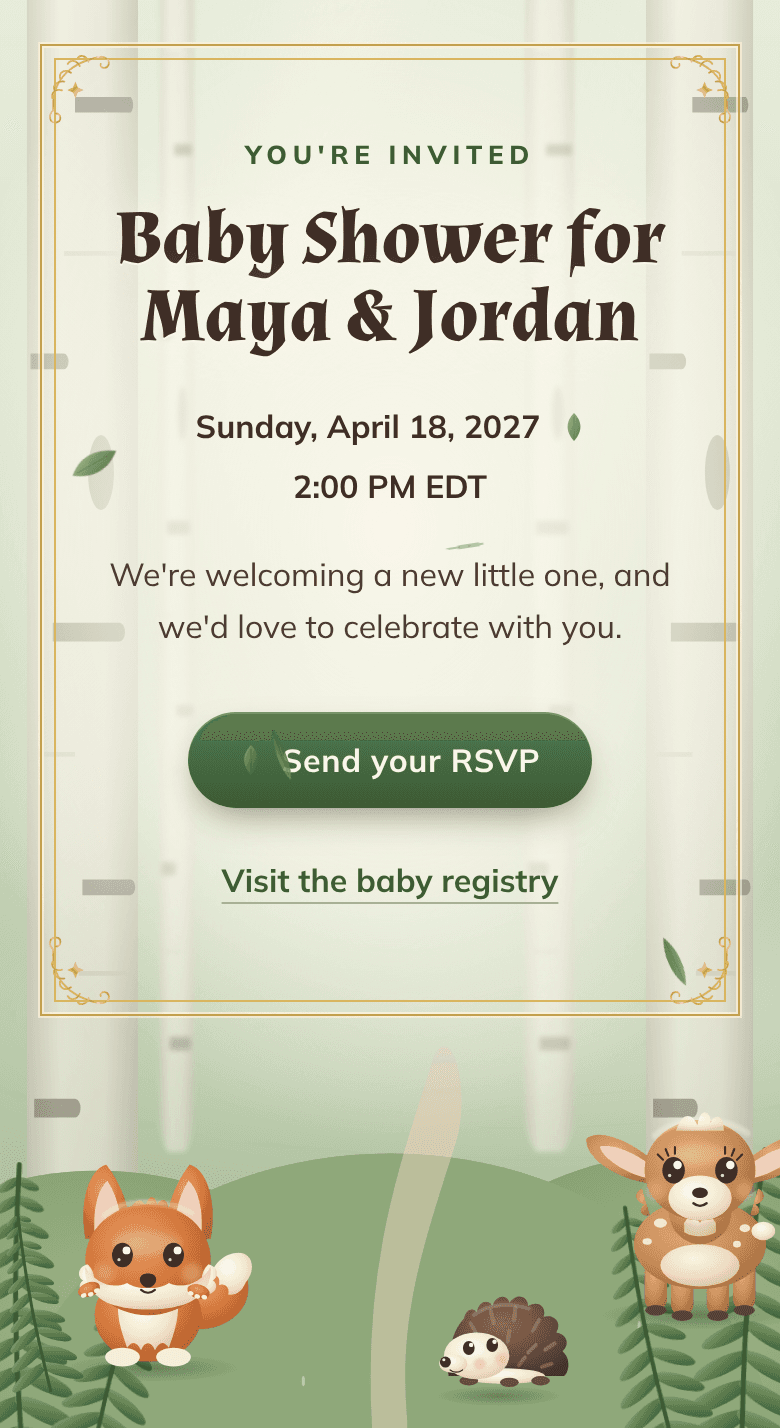
Here’s how to send baby shower invitations online: text, email or message each guest the link to your invitation, with who it’s for, the day and time, and the date to reply by. Send it four to six weeks before the shower, then check each reply against your guest list.
In this guide
How to send baby shower invitations online, step by step
Start the guest list six to eight weeks out, send the link four to six weeks before the shower, and nudge anyone missing a week before the RSVP date. Here are the six steps, in order.
- Six to eight weeks out: get the guest listAsk the parents-to-be for every name, a phone number or email for each, and who’s invited with them: a partner, kids, a plus-one. Anyone who’ll travel gets a save-the-date right away. Both messages are in the next section.
- A few days before: proofread the invitation out loudNames, date, start time, place, registry link and RSVP date. Then have someone else read it: a fresh pair of eyes catches the typo you’ve stopped seeing.
- Four to six weeks out: test the link on your own phoneText it to yourself and open it. Tap every button, like directions or the registry, but skip the test RSVP unless you can delete it: otherwise it counts with the real replies.
- Same day: send it to everyoneSo nobody hears about it secondhand. Use each guest’s usual channel, and note the date next to their name.
- A week before the RSVP date: check your listCheck off every reply, then send a friendly nudge to the names still missing.
- The day after the RSVP date: count headsAdd up the people coming, answers by text or phone included, for the food and the chairs.
For a Sunday, April 18 shower: the guest list by March 7, the invitations out between March 7 and March 21, and replies due April 4 or April 11.
Send day, in order
- Read the invitation out loud one last time
- Open the registry link: it should open for anyone, with items on it
- Copy the link with its copy button instead of retyping it
- Text it to yourself and open it on your phone
- Tap every button: directions, registry, the RSVP form (without sending a reply)
- Get your message ready, with your link in it
- Send it to the parents-to-be first (unless it’s a surprise), and wait for their OK
- Send during the day, not late at night
- Send it to every guest, by text, email or message
- Write the date sent next to each name on your list
One typo, two messages
Baby shower invitation texts and emails to copy
The message around the link needs five things: who it’s from, who the shower is for, the day and time, the link, and the RSVP date. The invitation holds everything else.
Every message needs
- Your name, unless they’ve saved your number
- Who it’s for: “Maya & Jordan’s baby shower”
- The day and time, copied from the invitation so the two never disagree
- The link itself, with a space or a line break on each side
- The RSVP date, and where to reply: “on the invitation,” not by text
That last point matters. A reply to your text won’t appear with the other RSVPs unless you add it yourself.
Paste the link itself, not a screenshot of the invitation: a picture can’t be tapped. Want to send the picture too? Send the link right after it.
In these messages, Maya & Jordan are a made-up couple, Priya is the host, and [link] is where your link goes. Swap in your own details.
Before you send
“Hi Maya! I’m getting the shower invitations ready. Could you send me everyone you’d like there, with a phone number or email for each? And let me know whose partners and kids are invited, and who can bring a plus-one, so the invitations can say so.”
“Hi Nina, it’s Priya, Maya’s friend! Save the date: Maya & Jordan’s baby shower is Sunday, April 18 at 2 PM, in Brooklyn. I’m telling you early in case you need to book travel. The invitation, with the RSVP, follows in March.”
By text
“Hi Rosa, it’s Priya. We’re throwing Maya & Jordan a baby shower on Sunday, April 18, from 2 to 4 PM, and we’d love you there. Everything’s on the invitation, and you can RSVP there by April 4: [link]”
“Rosa! Baby shower for Maya & Jordan, Sunday, April 18 at 2 PM. Details and RSVP (by April 4) here: [link]”
“Hi Dana, this is Priya, Maya’s friend from college. I’m hosting Maya & Jordan’s baby shower on Sunday, April 18 at 2 PM, and they’d love you to come. The details and the RSVP are here: [link] Please reply there by April 4.”
“Hi Lou, it’s Priya, Maya’s friend. You’re invited to Maya & Jordan’s baby shower on Sunday, April 18 at 2 PM! Tap the link below to see the address and to reply. There’s nothing to download. [link] If it gives you any trouble, call me and I’ll write down your answer.”
In a group chat
“Hi everyone, Priya here. You’re invited to Maya & Jordan’s baby shower on Sunday, April 18 at 2 PM. The details and the RSVP are here: [link] Please reply there by April 4, not in this thread, so nobody gets missed.”
By email
“You’re invited: Maya & Jordan’s baby shower, Sunday, April 18”
“Hi everyone, we’re celebrating Maya & Jordan and their little one on Sunday, April 18, from 2 to 4 PM, and we’d love you to join us. The address, the registry and the RSVP are all here: [link] Please reply there by April 4. See you soon, Priya”
Throwing a second shower at work? It needs its own invitation and link.
“Hi team, Maya’s leave starts soon, so we’re throwing a baby shower: Thursday, April 15 at 12:30 PM, in the fourth-floor conference room. Please RSVP by Monday, April 12 so we can order enough lunch: [link]”
On WhatsApp, Messenger or Instagram
“Hey Sam, it’s Priya. I’m hosting a baby shower for Maya & Jordan on Sunday, April 18 at 2 PM, and you’re on the list. Could you RSVP here by April 4? [link]”
Saying who’s invited
Add one line when the invitation covers more than one person, so guests know who to count when the RSVP asks how many are coming.
“Alex and the kids are invited too, so count everyone who’s coming when you RSVP.”
“You’re welcome to bring someone: just count them when you RSVP.”
“We’re keeping this one adults only, so please count only the grown-ups when you RSVP.”
Before you have a place
No venue yet? Say so, and send the address later to everyone who said yes or hasn’t answered yet.
“Hi Rosa, it’s Priya! Save Sunday, April 18 at 2 PM for Maya & Jordan’s baby shower. We’re still choosing the place, so I’ll send the address soon. RSVP here by April 4: [link]”
When you have it, send one of our update messages; they also cover a changed time or place.
For the invitation text itself, start with our baby shower invitation wording guide.
Text, email, WhatsApp or paper: the right channel for each guest
Send each guest the link where they already read their messages. Mixing channels is fine: the link is the same everywhere, and every reply lands in the same place.
- Friends who text every day: an individual text. It’s the quickest to open.
- A crew that already has a group chat: that chat, if everyone in it is invited.
- Relatives who live in their inbox, and coworkers: an email, with every address in BCC so nobody’s address goes out to the whole list.
- Guests on WhatsApp, Messenger or Instagram: a private message in that app.
- Guests in another country: WhatsApp or email, which travel over the internet, with the time zone next to the time. A text to a number abroad can cost extra on some phone plans.
- The parents-to-be: the link first, unless it’s a surprise. They’ll want to see it, and they’ll spot a wrong name fast.
- A guest who doesn’t text or email: a phone call, or a card in the mail with the details, the link and your number.
Putting the link on a card
Print the address in full, without the https://, large enough to read: a guest can type it into any web browser.
A QR code works too: make one from your link with any QR code generator. Pick a static code, which holds the address itself, so it keeps working whatever happens to the site that made it. Then scan it with two different phones before you print.
“You’re invited to Maya & Jordan’s baby shower: Sunday, April 18, 2 PM, at [address]. RSVP by April 4 by calling Priya at [your number], or online: [link]”
Co-hosts can send it too
Sharing the hosting? Each co-host can send the same link to their part of the list, and the parents-to-be to theirs. Every reply still lands in one place.
“Here’s the link to the shower invitation: [link] Could you send it to the people on your part of the list? Ask them to RSVP there, not to you, so every answer lands in one place.”
Who can open it
Group text or individual texts?
Individual texts are the safer choice for most guest lists.
A group text is fast: one message, and everyone’s invited. But in most group texts, everyone can see everyone else’s number, and every “Can’t wait!” pings the whole thread.
Individual texts take longer, but each one feels personal, nobody’s number gets shared, and you can add a line just for that person.
Text guests one by one if
- They come from different parts of the parents’ lives: family, work, old friends
- Some of them wouldn’t want their number shared with people they don’t know
- You’d like to add a personal line, like “Rosa, it wouldn’t be the same without you”
- A few guests mute every group chat (you know who they are)
A group text is fine for a close crew that already has a chat going, like college friends or cousins. Just ask for RSVPs on the invitation, not in the thread, or the answers get buried under the congratulations.
Write once, send one by one
Make sure every guest can open the link
To make sure every guest can open the link, copy it instead of retyping it, leave a space on each side, and put your name in the first line of your message. Then check what it looks like when it arrives.
What guests see before they tap
Many messaging apps turn a link into a small preview, often the page’s title and web address, sometimes with a picture or a line of description. The site that hosts the invitation decides what goes in it.
Some apps show it right away, some only after a tap, and some not at all. So make sure your message makes sense on its own, and look at the preview in the text you sent yourself.
Texting someone new?
If a guest says the link won’t open
First, open it yourself. If it works for you, the invitation is fine, and the problem is somewhere between your message and their phone.
- Ask them to save your number. On an iPhone, a link texted from a number they haven’t saved may stay switched off until they add you to their contacts or reply to you.
- Send it again, untouched. Copy it instead of typing it out: one wrong letter leads to a page that doesn’t exist.
- Give it room. Leave a space on each side of the link, with no word or punctuation stuck to it.
- Try another channel. If a text didn’t work, send an email, or the other way around.
- Type it in. The address works in any web browser, so a guest can type it straight into the address bar.
“Hi Rosa, it’s Priya again. Here’s the shower invitation one more time: [link] It should open right in your phone’s web browser. If it still won’t, text me back and I’ll send you the details.”
How to track baby shower RSVPs
To keep track of baby shower RSVPs, keep your own list of everyone you invited and check off the replies each time you look. An RSVP page behind a shared link only knows who answered; your list knows who didn’t.
Your list only needs
- Each guest’s name
- Their phone number or email
- How you sent the link, and the day
- Who’s invited with them
- Their answer, and how many people are coming
- Any answer that came another way, like a text back or a call
There’s no need to check every day. Look a week before the RSVP date, to send your nudges, and again the day after it, for the final count.
Good to know
On an InviteByLink baby shower website, guests RSVP with no app or account: their name, yes or no, how many people (up to 12) and, if they like, a note. Your dashboard counts the replies and the people attending, whichever way you sent the link, and lists every reply, newest first; a newer reply under the same name replaces the earlier one in the totals. Only you can open it, by signing in with the email you published with, so pass the count on to your co-hosts.
Your website’s Copy link button is on the screen that confirms it’s live, and in your dashboard; the email that confirms it has the link and a message ready to paste, and we send nothing to your guests. Check every detail in the preview first: once it’s live, you can’t edit it yourself, though we’ll correct your details for free. The RSVP on a live example shows the guest side, and saves nothing you type.
Before the RSVP date, send a friendly nudge to anyone still missing: our baby shower reminder messages are ready to copy, from the first nudge to the day-before text.
Questions
Is it okay to send baby shower invitations by text?
Is a group text okay for baby shower invitations?
Can you send baby shower invitations on WhatsApp?
Should the parents-to-be get the invitation link?
What if a guest can’t open the link?
How do I know who hasn’t replied?
Why ask guests to reply on the invitation, not by text?
Can you put an online invitation link on a paper card?